How To Fix Automatic Cat Feeder Portion Control Dispensing Too Much Kibble?
Does your cat’s automatic feeder pour out way more kibble than you programmed? You are not alone.
This is one of the most common complaints among cat owners who use smart feeders. One day, the portions look perfect. The next day, your cat gets a mountain of food instead of a neat little scoop.
The good news is that this problem usually has a simple fix. Most over dispensing issues come from small, fixable causes. An overfilled hopper, a loose power cable, or a rotor that needs cleaning can all throw off your feeder’s accuracy.
In a Nutshell
- Check the food level first. Overfilling the hopper above the rotor is the top cause of over dispensing. Keep kibble at or below the rotor height for accurate portions.
- Use the correct power adapter. A wrong or weak adapter can cause the motor to misfire and release extra food. Always plug in the original cable that came with your feeder.
- Reset your feeder properly. Hold the increase button for six seconds while the feeder is in locked mode. This clears any glitches in the system.
- Cycle the power. Unplug the feeder, wait a few seconds, then plug it back in. This simple step often fixes dispensing errors instantly.
- Clean the mechanism regularly. Dust and old kibble crumbs can jam the rotor. A clean feeder measures portions more accurately.
- Reprogram your portions. Set meals in small increments, usually based on 1/12 cup units, and split them into multiple feedings for better control.
Why Automatic Cat Feeders Dispense Too Much Kibble
Automatic cat feeders dispense too much kibble for several straightforward reasons. Understanding these causes helps you fix the problem quickly.
Overfilled hoppers are the number one culprit. When you fill the food container above the rotor height, gravity pushes extra kibble into the dispensing mechanism. The rotor cannot control the flow properly. Food pours out in larger amounts than your settings allow. This happens because the feeder relies on precise food levels to measure portions accurately.
Mechanical misalignment occurs when the rotor does not sit perfectly in place. Small shifts happen from normal use, vibrations, or improper assembly. When parts are not aligned, the rotor cannot block food correctly. Extra kibble falls through gaps during each cycle.
Power supply issues cause motors to malfunction. An incorrect or weak power adapter sends inconsistent energy to the motor. The motor may spin faster or slower than intended. This changes how much food gets released with each rotation. Always verify you are using the original adapter designed for your feeder.
Dust and debris accumulate inside the mechanism over time. Old kibble crumbs and dust particles jam the rotor or block sensors. When parts cannot move freely, the feeder cannot dispense controlled amounts. Buildup prevents the mechanism from stopping at the right moment.
Programming errors also play a role. If portions are set too high or the feeder was not reset after troubleshooting, extra food dispenses. Many feeders measure portions in small units like 1/12 cup increments. Setting the wrong number of units releases significantly more food than intended.
These causes are all fixable with basic maintenance and adjustments.
Understanding Portion Units and Calibration Settings
Portion units tell you exactly how much food your feeder releases with each cycle. Most automatic cat feeders use 1/12 cup increments as their standard measurement. This means each portion setting equals roughly one twelfth of a cup of kibble.
Understanding these units matters because your feeder’s accuracy depends on correct programming. If you set your feeder to dispense 4 portions, it should release about one third cup of food. When it dumps too much, the problem often lies in how you’ve calibrated those units.
Your cat’s weight and age determine the right portion size. A 10 pound adult cat typically needs 1 to 1.5 cups daily, split into multiple meals. Kittens and senior cats have different caloric needs, so adjust your portion calculations accordingly.
Calibration settings control how the rotor aligns with the food hopper. When you calibrate, the feeder learns exactly where to stop dispensing. Poor calibration causes the rotor to stay open too long, releasing extra kibble each time.
Check your feeder’s manual for the exact portion increment size. Some models use different measurements than others. Write down your cat’s daily caloric requirement and divide it by the number of meals you plan to serve.
Start with smaller portions than you think you need. You can always increase portions gradually if your cat seems hungry. This approach prevents accidental overfeeding while you dial in the right settings.
Test your feeder with a measuring cup before feeding your cat. Place the cup under the dispenser and run one cycle. Compare what actually comes out to what you programmed. This simple test reveals whether your calibration is accurate.
Step-by-Step: Adjusting the Food Hopper Fill Level
The food hopper fill level directly affects how much kibble your feeder dispenses. When the hopper sits too full, gravity pushes extra food into the rotor chamber, causing over dispensing every time the motor cycles.
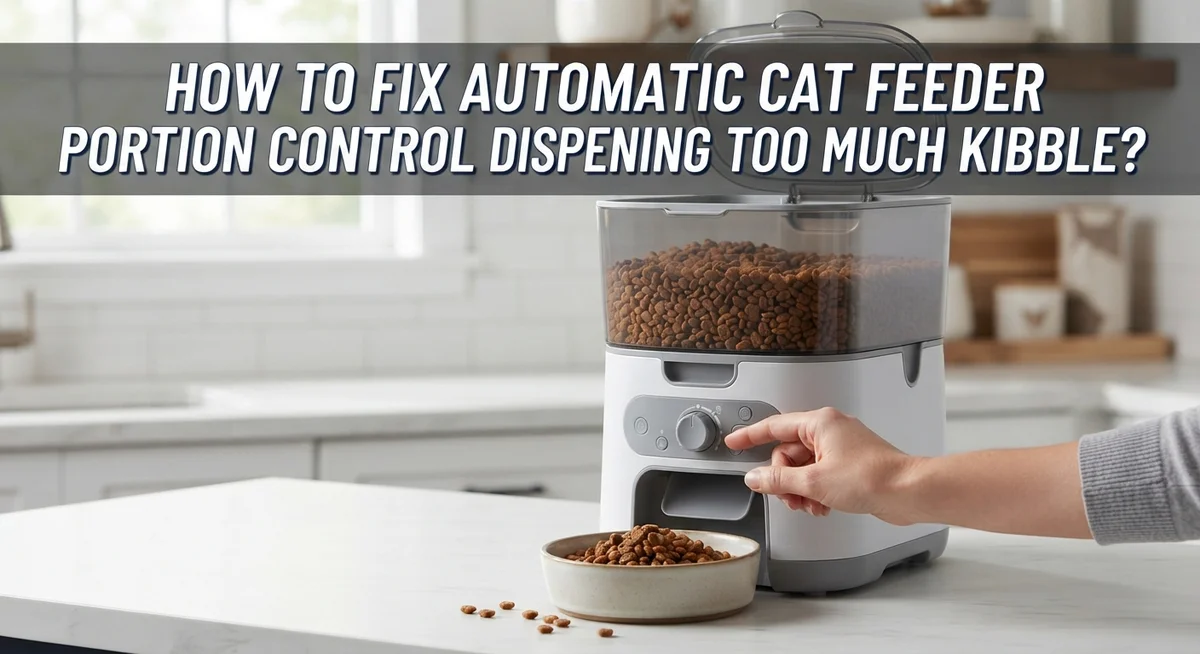
Start by emptying your feeder completely. Remove the hopper and set it aside. Look inside the main chamber where the rotor sits. You’ll see a clear line or marking that shows the maximum safe fill height. This line exists for a reason: it keeps food at the right level for accurate portions.
Fill the hopper only to the rotor height. Never pile kibble above this point. The rotor needs space to rotate freely without extra pressure from food above it. When food sits too high, it creates constant downward force that pushes kibble into the dispensing mechanism.
After refilling to the correct level, close the hopper securely. Make sure all latches click into place. A loose hopper can shift during feeding cycles, which changes how food sits in the chamber.
Test your feeder by running one cycle into a measuring cup. Check if the portion matches your programmed setting. If it still dispenses too much, the hopper fill level may not be your only issue.
Keep the hopper at this proper level every time you refill it. Check the food level daily or every other day depending on your cat’s appetite. This simple habit prevents over dispensing and keeps your feeder working accurately. Consistent hopper fill levels mean consistent portion control. Your cat gets the right amount of food at every meal.
Step-by-Step: Resetting and Reprogramming Portion Sizes
Your feeder needs a proper reset to stop dispensing too much kibble. This process clears any incorrect programming and restarts the system fresh.
First, locate your feeder’s control panel. Find the increase button, which usually has a plus sign or up arrow. Make sure your feeder is in locked mode before you begin. Some models have a lock switch you need to engage first.
Hold down the increase button for exactly 6 seconds. You should see lights flash or hear a beep. This signals that your feeder is resetting to factory settings. Release the button and wait a moment for the system to complete the reset cycle.
Next, disconnect the power cable from your feeder. Wait about 10 seconds. This gives the internal circuits time to fully power down. Reconnect the power cable to complete a full system cycle.
Now reprogram your portion sizes from scratch. Check your feeder’s manual for the correct portion increment. Most feeders use 1/12 cup units as their measurement standard. Start by programming smaller portions than you think you need.
Test your new settings before feeding your cat. Run one cycle into a measuring cup to verify the amount. If it still dispenses too much, repeat the reset process and try smaller portion numbers.
Always use the original power adapter that came with your feeder. Incorrect power sources can cause the motor to malfunction and dispense irregular amounts. Keep your power connection secure and check it regularly.
Program multiple small meals instead of one large meal. This approach works better for food motivated cats and gives you more control over daily portions.
Checking Power Sources, Rotor Alignment, and Mechanical Parts
Your automatic cat feeder depends on three main systems working together. These are the power source, rotor alignment, and mechanical parts. When your feeder dispenses too much kibble, one of these systems is usually the culprit.
Start with your power source first. Check that you’re using the original power adapter that came with your feeder. Incorrect adapters can cause the motor to run at the wrong speed. This makes the rotor spin faster or slower than intended. Verify the cable connects firmly to both the feeder and the wall outlet. A loose connection prevents consistent power delivery.
Next, inspect the rotor alignment carefully. The rotor is the rotating disc that controls kibble release. It must sit perfectly centered in the hopper opening. If it tilts or sits off center, more food falls through during each cycle. Gently remove the hopper and look at how the rotor sits underneath. It should be level and centered. Adjust it by hand if needed, then replace the hopper.
Check all mechanical parts for damage or wear. Look inside the feeder for broken gears, cracked plastic, or bent metal pieces. These parts control the rotor’s movement. Even small cracks affect how much food dispenses. Also examine the locking mechanism that holds the hopper in place. A loose hopper can shift during operation and change portion sizes.
Clean out any dust or food debris from inside the mechanism. Use a dry cloth or soft brush. Debris can jam gears and cause irregular dispensing. After cleaning and adjusting, disconnect the power for 30 seconds. Reconnect it to cycle the system fresh. Test your feeder with a measuring cup to confirm it now dispenses the correct amount.
Cleaning the Dispensing Mechanism for Consistent Accuracy
Debris and old kibble particles inside your feeder create friction. This friction stops the rotor from turning smoothly. When the rotor doesn’t align properly, it releases extra food on each cycle.
Start by unplugging your feeder completely. Safety comes first when you work with any electrical device. Remove the food hopper and empty any remaining kibble into a container.
Use a dry brush or soft cloth to wipe inside the hopper. Pay special attention to the rotor area where food sits. Dust and crumbs build up around the rotating disc over time. These particles jam the mechanism and cause misalignment.
Next, inspect the rotor disc itself. Look for cracks, warping, or bent edges. A damaged rotor cannot dispense accurate portions. If you see damage, the rotor may need replacement.
Clean the chute where kibble falls through. Food particles stick to the sides and slow down the dispensing process. A slow dispense often means the feeder compensates by opening wider, releasing more kibble than intended.
Wipe down all moving parts with a slightly damp cloth. Let everything dry completely before reassembling. Moisture inside the feeder can cause corrosion and mechanical failure.
Once dry, reassemble your feeder carefully. Make sure the rotor sits flush with the hopper opening. Any gap or misalignment causes inconsistent portions.
Plug in your feeder and run a test cycle into a measuring cup. Clean feeders typically dispense more accurately after this maintenance. If portions remain too large, your calibration settings may need adjustment or the rotor might have internal damage requiring professional repair.
Common Mistakes That Cause Overdispensing
Many cat owners struggle with feeders that dispense too much kibble. Understanding the common mistakes helps you fix the problem quickly.
Overfilling your hopper is the number one culprit. Kibble piled above the rotor height creates pressure on the dispensing mechanism. This extra weight forces more food through each cycle than intended. The rotor cannot control portions accurately when food sits too high. Always fill your hopper only to the rotor height line. Check your feeder’s manual to find the exact fill level for your model.
Using the wrong power adapter causes dispensing errors too. Your feeder needs consistent electrical power to work correctly. An adapter with incorrect voltage or amperage disrupts the timing mechanism. Always use the original power adapter that came with your feeder. Borrowed or replacement adapters may seem to work but create irregular portions.
Improper programming leads to overdispensing as well. Many people set portion sizes without checking their cat’s actual needs. You must consider your cat’s weight, age, and activity level. A sedentary indoor cat needs smaller portions than an active kitten. Read your feeder’s manual to understand portion increments. Most feeders use 1/12 cup units as their measurement system.
Skipping the reset process after troubleshooting prevents fixes from working. Your feeder stores old programming data that conflicts with new settings. Hold the increase button for exactly 6 seconds in locked mode to reset properly. This clears all previous commands from the system.
Mechanical misalignment also causes excessive dispensing. The rotor disc must sit perfectly aligned with the chute opening. Even slight shifts create larger openings for kibble to fall through. Check your feeder’s alignment after each refill.
Troubleshooting Persistent Portion Control Problems
When your automatic cat feeder continues dispensing too much kibble despite previous troubleshooting attempts, you need a systematic approach. Persistent overdispensing usually points to one of three areas: power delivery problems, mechanical wear, or calibration errors.
First, verify your power connection once more. Unplug the feeder for 30 seconds, then reconnect it. This full power cycle resets the internal logic board and often resolves lingering dispensing issues. If overdispensing continues, the power adapter itself may be failing and delivering inconsistent voltage to the motor.
Next, perform a complete system reset. Locate the increase button on your feeder’s control panel. Hold it down for 6 seconds while the feeder is in locked mode. This action clears any corrupted programming from memory and returns settings to factory defaults. After resetting, reprogram your portion sizes using smaller increments than before.
Test the feeder multiple times into a measuring cup before feeding your cat. Measure exactly what comes out during each cycle. If portions remain inconsistent, mechanical wear inside the rotor assembly is likely the cause. The gears or rotor disc may have developed play or damage that prevents accurate portion control.
If testing reveals the feeder still overshoots portions, consider using multiple small meals throughout the day instead of fewer large ones. This approach works around mechanical limitations while still meeting your cat’s daily calorie needs. Program the feeder to dispense smaller amounts at each feeding time, spacing meals 4 to 6 hours apart.
Keep detailed records of what the feeder dispenses during each test. This documentation helps you identify patterns and determine whether the problem is random or consistent. Consistent overdispensing suggests mechanical failure, while random variations point to electronic issues.
Final Thoughts
Fixing portion control issues takes patience and careful observation. Most problems come from simple causes like overfilling or skipped resets.
You don’t need special tools to solve this. A little attention to detail makes a big difference.
Start with the basics every time. Check the hopper level, confirm your power source, and reset the system properly.
These three steps solve most overdispensing problems. Skipping any one of them often leads to repeated frustration.
Consistency matters more than perfection. Your feeder won’t be flawless on the first try after adjustments.
Test it several times before trusting it with your cat’s meals. This protects your pet from sudden diet changes.
Remember that mechanical parts wear down over time. What worked perfectly last year might need recalibration now.
Regular cleaning and inspection keep your feeder accurate for longer. Think of it as routine maintenance rather than a one time fix.
If problems continue after trying these fixes, don’t ignore them. Persistent overdispensing can affect your cat’s health and weight.
Small kibble amounts add up quickly when a feeder consistently gives too much. This matters most for cats with weight management needs.
Keep a simple log of dispensed amounts for a week. This record helps you spot patterns and confirms whether your fixes worked.
Your cat depends on you to catch these issues early. A well calibrated feeder supports better health and portion control overall.
Most owners find their feeder works reliably once they address the root cause. The fixes covered here handle the vast majority of dispensing problems.
With regular checks and proper care, your feeder can serve your cat well for years. Trust the process and stay patient with adjustments.
Frequently Asked Questions
Why is my feeder dispensing way too much kibble?
The most common reason is an overfilled hopper. When kibble sits above the rotor height, it creates extra pressure. This pressure forces more food through the dispenser opening than intended. Check that your food level stays below the rotor mechanism. Also verify you’re using the correct power adapter for your model.
How do I reset my automatic feeder?
Hold down the increase button for 6 seconds while your feeder is in locked mode. This performs a complete system reset. After resetting, disconnect the power cable and wait 30 seconds. Reconnect the power to cycle the system fresh.
What portion size should I program?
Most feeders measure portions in 1/12 cup increments. Your cat’s correct portion depends on age, weight, and activity level. A 10 pound adult cat typically needs about 1/2 to 3/4 cup daily, split across meals. Consult your veterinarian for your specific cat’s needs.
How do I know if my fix actually worked?
Run a test cycle into a measuring cup before feeding your cat real meals. Do this at least three times to check consistency. Record what you measure each time. If the amounts match your programmed portion, the feeder is working correctly. If not, the problem persists and needs further investigation.
Can I prevent this problem from happening again?
Yes. Keep your hopper filled only to the proper level, never above the rotor. Use the original power adapter always. Clean the dispensing mechanism monthly to remove dust and debris. Check that all locks and latches seal properly before each use.

Hi, I’m Archie Flynn, the founder and writer behind RapidResizerHub! 👋 I’m a passionate tech enthusiast who loves exploring the latest gadgets, smart devices, and trending electronics on Amazon. Through my honest, hands-on reviews and detailed buying guides, I help readers make smarter, well-informed shopping decisions.