
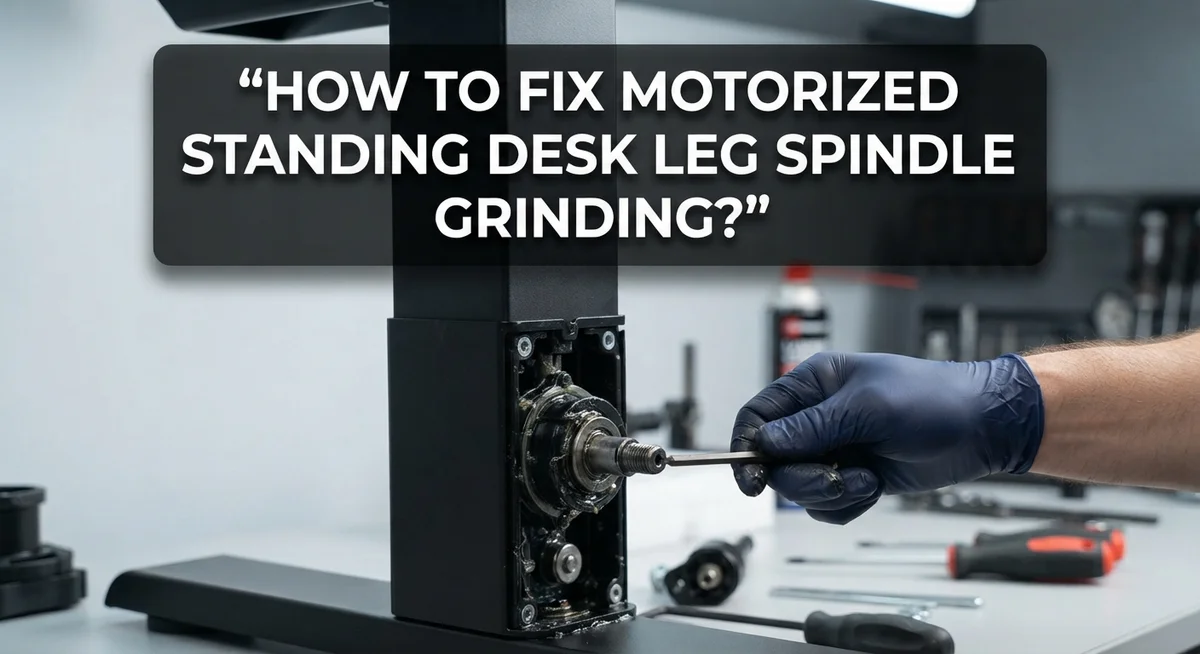
How To Fix Motorized Standing Desk Leg Spindle Grinding?
Does your standing desk make a strange grinding noise when it moves up or down? You are not alone. Many people face this issue with motorized standing desks.
The grinding sound often comes from the leg spindle. This part helps your desk rise and lower smoothly. When something goes wrong inside it, that smooth motion turns rough.
This noise can feel alarming. But most of the time, the fix is simple and does not need a technician.
In a Nutshell
- Dust and dirt often build up inside the spindle cover. This causes friction and a grinding sound. A simple clean up can solve this fast.
- Dry threads inside the spindle need lubrication. Without grease, metal parts rub together. This creates that harsh noise you hear.
- Loose leg bolts can also cause grinding. Check all screws and bolts on the leg column. Tighten them if they feel loose.
- Misaligned legs put stress on the spindle. This happens if your desk was not assembled correctly. Realigning the legs often fixes the problem.
- Worn out gears inside the motor are a bigger issue. This usually happens after years of use. You may need a replacement part for this.
Understanding the Leg Spindle Mechanism and Why Grinding Occurs
Your motorized standing desk leg spindle works like a screw mechanism. The spindle is a threaded rod that moves up and down inside a metal tube. When you press the button, an electric motor turns the spindle. This spinning motion lifts or lowers your desk legs.
The spindle has several key parts. A motor sits at the top and powers the rotation. Threads run along the entire spindle shaft. A nut or collar grips these threads and moves along them. Guide rails keep everything aligned as it moves. Metal bushings reduce friction between parts.
Grinding occurs when friction increases inside this system. Dust settles on the threads over time. This dust mixes with old lubricant and becomes sticky. When the motor tries to turn the spindle, it fights against this buildup. The result is that grinding sound you hear.
Dry threads are another common cause. Lubrication dries up after months of use. Metal rubs directly against metal without protection. This creates noise and increases wear on parts.
Loose bolts amplify the problem. When leg bolts aren’t tight, the spindle moves slightly side to side. This misalignment forces the threads to bind. The motor works harder and makes more noise.
Worn gears represent a more serious issue. If your desk is several years old, internal gears may have degraded. Gear teeth can crack or strip over time. This causes a different grinding sound that sounds rougher and more severe.
Understanding these causes helps you identify your specific problem. Listen carefully to the noise. Is it a light grinding or a harsh sound? Does it happen at certain heights? These details guide your next steps toward a solution.
Common Causes of Grinding Noise in Motorized Standing Desk Legs
Dust accumulation is one of the most common culprits behind grinding sounds. Over time, particles settle inside the spindle housing where the motor connects to the leg. These particles get caught between moving components and create friction. Regular cleaning prevents this buildup from worsening.
Lack of lubrication causes the spindle threads to rub together harshly. The threads need proper moisture to move smoothly up and down. When lubrication dries out, metal contacts metal directly. This direct contact produces that grinding noise you hear.
Loose bolts connecting the leg to the motor base amplify vibrations significantly. Even small gaps between bolts and their holes allow unnecessary movement. This movement transfers directly to the spindle mechanism. Tightening these bolts often reduces or eliminates the noise.
Misalignment happens when desk legs sit unevenly on your floor. Uneven surfaces force one leg to work harder than others. The spindle on the misaligned leg experiences extra strain. This strain manifests as grinding sounds during movement.
Worn motor gears represent a more serious problem. Gears inside the motor housing can develop flat spots or cracks over time. Damaged gears produce grinding rather than smooth rotation. This issue typically requires professional attention or component replacement.
Electrical problems can also trigger grinding noises. Faulty wiring causes the motor to stall and restart repeatedly. Each restart attempt creates a grinding sensation. Check your electrical connections before assuming mechanical failure.
Identifying which cause applies to your desk helps you choose the right fix. Start by cleaning the visible areas around your spindle. Listen carefully to determine if the noise changes with different desk heights. This information guides your troubleshooting efforts effectively.
Tools and Preparation Needed Before Troubleshooting
Before you start fixing your desk, gather the right tools. This preparation saves time and prevents damage to your equipment.
Basic cleaning supplies are your first line of defense. You will need a soft brush to remove dust from the spindle area. A microfiber cloth works well for wiping down components. Compressed air helps blast out debris from tight spaces inside the leg mechanism.
Lubrication tools come next. Get a spray lubricant designed for mechanical parts. You may also need a small brush or applicator to reach narrow spindle threads. Wipe away excess lubricant with a clean cloth after application.
Hardware tools are essential for tightening bolts. A wrench set covers most desk leg bolt sizes. An adjustable wrench gives you flexibility if you do not have the exact size. A socket set with a ratchet handle speeds up the process.
Measuring and checking tools help you identify problems. A level shows whether your desk legs sit evenly on the floor. A straightedge reveals if legs are bent or misaligned. These simple tools prevent you from missing alignment issues.
Safety equipment protects you during the process. Wear safety glasses to keep dust out of your eyes. Work gloves protect your hands from sharp edges. Keep a small towel nearby to wipe your hands.
Documentation tools help track your progress. Take photos before you start work. Write down which bolts you tighten and how much lubricant you apply. This record helps if you need to troubleshoot later.
Gather everything before you begin. Working with organized tools makes the entire repair faster and more effective. You will feel more confident tackling the problem when everything sits within arm’s reach.
Step-by-Step Guide to Diagnosing the Grinding Sound
Start by listening carefully to when the grinding sound happens. Does it occur when the desk moves up, moves down, or both directions? This detail tells you a lot about what’s wrong.
Next, watch the desk legs closely as they move. Look for any wobbling or uneven movement. Legs that shift side to side suggest alignment issues. Legs that stay straight but still grind point to spindle problems inside.
Check if the noise is loud or quiet. A soft grinding might mean dust buildup or minor dryness. A loud, harsh grinding suggests worn gears or serious spindle damage.
Press down gently on different parts of the desk while it’s stationary. Feel for any movement in the leg bolts. Bolts that move easily are definitely loose and need tightening.
Look underneath the desk at the leg spindle covers. Dust and debris often collect there. Wipe away any visible dust with a dry cloth. Notice if the covers look cracked or damaged.
Try moving the desk through a full cycle from lowest to highest position. Listen during the entire movement. Does the grinding stay constant or change at certain heights? Grinding that stops at specific heights points to alignment problems.
Check the floor around your desk. Is it level, or does one side sit lower than the other? An uneven floor forces the spindle to work harder on one side.
Finally, inspect the motor base where legs connect. Look for any visible damage, loose connections, or missing bolts. Take photos of what you see. These observations guide your next repair steps and help you decide if professional help is needed.
How To Fix the Spindle Grinding: Lubrication and Alignment Techniques
Once you’ve identified where the grinding comes from, you’re ready to tackle the fix. Lubrication is your first and most effective solution for most grinding problems. The spindle threads need proper lubrication to move smoothly without friction.
Start by locating the spindle area on your desk leg. You’ll find it where the motor connects to the threaded rod. Apply lubricant directly to the visible threads and around the spindle housing. Work the desk up and down several times to distribute the lubricant evenly throughout the system.
Let the lubricant sit for a few minutes. This allows it to penetrate deep into the threads where grinding typically occurs. Run the desk through another full cycle to ensure complete coverage.
Alignment issues often cause grinding too. Check if your desk sits level on the floor. Place a level tool on the desktop surface. If one side is higher than the other, adjust the feet at the base of each leg.
Tighten any loose bolts connecting the legs to the motor base. Use your wrench to secure each connection firmly. Don’t over tighten, as this can damage the threads or housing.
For stubborn grinding that continues after lubrication, inspect the spindle for visible damage or rust. Surface rust can be gently cleaned with a soft brush and cloth. Deep corrosion may require more intensive treatment.
Test your desk after each adjustment. Move it slowly through its full range to listen for improvements. Most grinding sounds disappear once you’ve lubricated the spindle and tightened loose connections. If grinding persists after these steps, the problem likely involves internal motor damage requiring professional service.
Tightening, Resetting, and Recalibrating the Motorized Legs
Resetting and recalibrating your motorized standing desk legs stops grinding and restores smooth operation. This process brings your desk back to factory settings and helps the motor relearn proper movement patterns.
Start by unplugging your desk from the electrical outlet. Wait at least 30 seconds. This clears any temporary errors stored in the motor’s memory. Plug it back in and listen for a beep or light indicator. Many desks signal they’re ready to recalibrate after a power reset.
Next, locate the reset button on your desk’s control panel. This button is usually small and recessed to prevent accidental pressing. Use a thin object like a paperclip to press and hold it for 3 to 5 seconds. You may hear a sound or see the legs move slightly. This means the reset is working.
After resetting, move your desk to its lowest position manually if possible. Some models require you to press the down button continuously until the legs stop moving. This helps the motor recognize the bottom limit. Then raise the desk to its highest point using the up button. This teaches the motor the full range of motion.
Test the desk through several complete cycles. Move it up and down slowly at first. Listen for any grinding sounds. The motor should operate smoothly without unusual noises.
If grinding persists after recalibration, the problem likely involves physical damage rather than software issues. Check for loose connections or worn parts at the spindle. Tighten all bolts securing the legs to the motor base. Proper recalibration combined with mechanical inspection usually resolves most grinding problems.
Common Mistakes to Avoid When Repairing the Spindle
Many people rush through spindle repairs and make errors that make grinding worse. Avoid forcing bolts too tight. When you over tighten connections, you create pressure that damages the spindle threads. Turn bolts until they feel snug, then stop. You don’t need to apply maximum force.
Don’t skip the lubrication step. Some people assume grinding means the spindle needs replacement. Usually, dry mechanisms just need proper lubricant applied to moving parts. Use the right type of lubricant for your desk model. Check your manual to see what works best.
Never work on your desk while it’s plugged in. Accidental activation during repairs causes injury and damage. Always disconnect power first, even if you’re just checking things.
Avoid applying lubricant to electrical components or the motor base. Liquid near electronics causes shorts and failures. Focus lubricant only on the spindle shaft and mechanical connection points where metal meets metal.
Don’t ignore alignment problems. Many people fix grinding by lubricating alone, but misalignment returns the problem later. Check that your desk sits level on the floor. Place a level tool on top to verify this.
Resist the urge to disassemble the entire leg assembly. You might lose small parts or forget how pieces fit back together. Work on one section at a time and photograph each step.
Stop testing immediately if grinding gets louder. Continuing to operate a damaged spindle causes more harm. Instead, unplug the desk and inspect for visible cracks or severe rust.
Finally, don’t expect instant results. After repairs, run your desk through several cycles slowly. Listen carefully for changes in sound. Grinding often improves gradually as lubricant works into tight spaces.
When to Seek Professional Repair or Warranty Support
Knowing when to call a professional saves you time and money. If grinding persists after lubrication and alignment attempts, your desk likely has internal damage that requires expert attention.
Professional repair becomes necessary when you notice these signs: The grinding sound gets louder despite your efforts. The desk moves unevenly or gets stuck at certain heights. You see visible cracks or deep rust on the spindle. The motor makes unusual noises beyond grinding sounds.
Check your desk’s warranty coverage first. Most motorized standing desks include warranties that cover mechanical failures for one to three years. Grinding caused by manufacturing defects falls under this protection. Contact the manufacturer with your purchase date and model number.
Document the problem before reaching out. Take videos of the grinding noise. Note when it started and what you’ve already tried. This information helps technicians diagnose the issue faster.
Many manufacturers offer phone support to troubleshoot problems before scheduling repairs. They can confirm whether your issue requires professional service or if simple fixes work. Some companies send replacement parts directly to your home.
If your warranty expired, get repair quotes from multiple sources. Local furniture repair shops often cost less than manufacturer services. However, manufacturer repairs guarantee proper parts and expertise.
Don’t attempt complex disassembly yourself. Opening the motor base or spindle housing without training can void remaining warranty coverage. You might also damage internal components further, making repairs more expensive.
Professional technicians have specialized tools your home toolkit lacks. They understand motorized desk mechanics completely. They work safely with electrical components. They typically complete repairs within days rather than weeks of troubleshooting.
When grinding affects your desk’s function or safety, professional help is the right choice.
Final Thoughts
Fixing a grinding spindle on your standing desk does not need to feel overwhelming. Most grinding issues come from simple causes like dust, dry components, or minor misalignment. A little patience goes a long way toward solving the problem.
Start with the easiest fixes first. Check for debris, apply lubricant, and test the desk slowly. These small steps often solve grinding noises without needing extra tools or expert help.
Remember that your safety matters most during any repair. Always unplug the desk before touching moving parts. This simple habit prevents accidents and protects your equipment from further harm.
Pay attention to how your desk responds after each fix. Grinding that fades quickly usually means you found the right solution. Noise that continues or grows louder signals a deeper issue.
Regular maintenance keeps grinding from coming back. Clean the spindle area every few months and check for loose screws. This routine care extends your desk’s lifespan and keeps it running smoothly.
Do not feel discouraged if the problem persists after trying these steps. Some issues need professional tools or replacement parts that go beyond basic repairs. Reaching out for help is a smart choice, not a failure.
Trust your instincts when something feels wrong with your desk. If grinding returns often or gets worse, stop using the desk until you find the cause. Ignoring the problem can lead to bigger repair costs later.
A well maintained standing desk should run quietly and lift smoothly. With careful attention and the right steps, you can restore that smooth motion. Your desk will serve you well for years to come.
Frequently Asked Questions
Why does my standing desk spindle grind even after lubrication?
Grinding can persist for several reasons. The spindle may have internal wear that lubrication alone cannot fix. Misalignment between the motor and spindle also causes grinding sounds. Check if the desk legs sit level on your floor. Uneven surfaces force the spindle to work at odd angles. You might also have debris trapped inside the mechanism. Try running the desk through several complete cycles to clear any particles. If grinding continues, the spindle likely needs professional inspection.
Can I fix spindle grinding without taking apart the leg assembly?
Yes, you can try fixes without full disassembly. Start by cleaning around the spindle base with a dry cloth. Remove any dust or debris blocking the mechanism. Next, apply appropriate lubricant to the spindle shaft following your desk’s manual. Run the desk up and down slowly to distribute the lubricant. Test the sound after waiting 30 minutes for the lubricant to settle. Many grinding issues resolve with these simple steps. Only disassemble if these methods fail and you feel confident doing so.
What should I do if grinding gets louder during my repair attempt?
Stop testing immediately. Louder grinding means something is getting worse. Turn off your desk and unplug it right away. Continuing to operate a worsening spindle can cause permanent motor damage. Give yourself time to assess what changed. Did you accidentally move something? Did you apply lubricant incorrectly? Review your steps carefully. If you cannot identify the issue, contact professional support. They can diagnose the problem safely without risking further damage.
Is spindle grinding always a warranty issue?
Not always. Grinding from normal wear or lack of maintenance may not qualify for warranty coverage. Check your desk’s warranty document first. Most warranties cover manufacturing defects but exclude maintenance related issues. Document the problem with videos and photos. Contact your manufacturer’s support team with this documentation. They will determine if your issue qualifies for coverage. If your warranty expired, professional repair shops can provide repair estimates. Getting multiple quotes helps you find affordable solutions.

Hi, I’m Archie Flynn, the founder and writer behind RapidResizerHub! 👋 I’m a passionate tech enthusiast who loves exploring the latest gadgets, smart devices, and trending electronics on Amazon. Through my honest, hands-on reviews and detailed buying guides, I help readers make smarter, well-informed shopping decisions.